Wagevio: A Timeless Handwritten Font
As a web designer, I'm always on the lookout for fonts that add personality without sacrificing readability. Wagevio fits perfectly into this criteria. It's a lovely and timeless handwritten font that brings warmth and character to any digital project. Whether you're working on a website, landing page, or app interface, Wagevio can elevate your design with its elegant strokes and natural flow.
Understanding Wagevio's Visual Characteristics
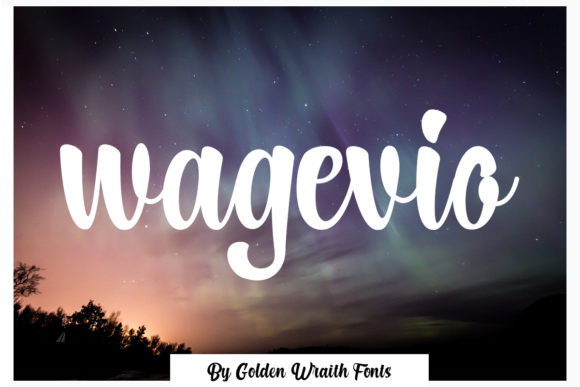
Wagevio has a distinct script style that mimics real handwriting. Its fluid curves and subtle variations in weight give it a human touch, making it ideal for branding and logos that need a personal feel. The font is PUA encoded, which means you have full access to all glyphs and swashes, allowing for greater creative flexibility.
This font works best in display contexts where legibility isn't the primary concern. It's not designed for long paragraphs of body text but shines when used as a headline, logo, or decorative element. Its unique personality makes it stand out in hero sections, call-to-action buttons, and other visual focal points.
Using Wagevio in Web Design Projects
For a creative portfolio site, Wagevio can be used in the header or as a signature at the bottom of each page. It adds a professional yet approachable tone that aligns well with artistic and design-focused brands. In a boutique online store, using Wagevio for banners or product titles can create a cohesive and memorable brand identity.
On a coaching website, Wagevio can be used in section headings or as part of the site's visual language to reinforce trust and authenticity. For a product landing page, it can be paired with a clean sans serif font to create contrast and visual interest. This combination helps guide the user's eye through the layout while maintaining a modern aesthetic.
Readability and User Experience Considerations
When using Wagevio on mobile screens, it's important to keep text sizes large enough to maintain clarity. On small buttons or icons, consider limiting the use of the font to short phrases or single words. For dark backgrounds, ensure there's sufficient contrast to avoid straining the eyes. On light backgrounds, the font's natural texture can add depth and dimension.
When overlaying text on images, use a semi-transparent background or a bold color to make the font more readable. These adjustments help maintain the font's elegance while ensuring it remains accessible across different devices and screen sizes.
Font Pairing Strategies
Pairing Wagevio with a simple sans serif font like Open Sans or Lato can create a balanced look that's both modern and approachable. This combination works well for websites that need a clean, professional appearance while still incorporating a touch of personality.
If you're aiming for an editorial or magazine-style design, pairing Wagevio with a serif font like Georgia or Merriweather can enhance the overall sophistication of the layout. This pairing is ideal for blogs, content sites, or digital publications where a refined aesthetic is desired.
Practical Applications for Digital Creators
For a digital course sales page, using Wagevio in the headline or subheadline can draw attention and convey a sense of authority. In social media graphics, it can be used to create eye-catching captions or headlines that reflect the brand's voice.
When designing a blog header, Wagevio can be used to highlight the site's name or a key message. It's also great for creating branded web content such as email templates, landing pages, or marketing materials that require a consistent visual identity.
Commercial Licensing and Font Availability
Before using Wagevio in client projects or commercial websites, check the licensing terms to ensure compliance. Most premium fonts like Wagevio come with commercial licenses that allow for use on websites, apps, and digital products. Make sure to review the specific terms related to webfont usage, file formats, and distribution rights.
Wagevio is available in multiple file formats, including OTF and TTF, making it easy to integrate into design workflows. If you're using it in a web project, consider converting it to a webfont format like WOFF or WOFF2 for optimal performance and compatibility.
Conclusion
Wagevio is a versatile and expressive font that adds a unique touch to digital design. Its handwritten style brings a sense of warmth and individuality that can enhance brand identity and user engagement. Whether you're working on a creative portfolio, online store, or SaaS landing page, Wagevio offers a stylish and effective solution for visual storytelling and typography.