Heyla: A Playful Script Font
There I was, staring at a blank brand board, trying to find the right tone for a boutique café’s rebrand. The client wanted something warm, inviting, and just a little bit whimsical. I tried a few serif fonts, some modern sans serifs, but nothing quite felt right. Then I opened Heyla.
What Is Heyla?
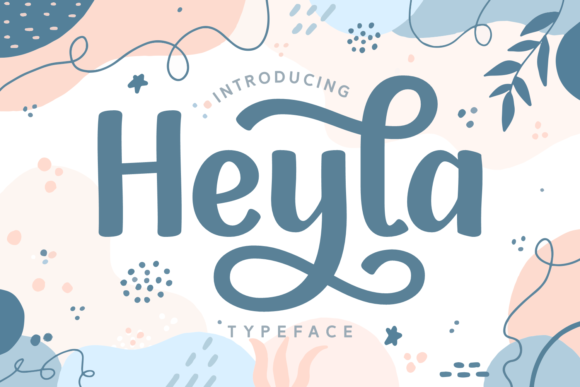
Heyla is a lovely script font featuring charming, playful characters that seem to dance along the baseline. It has a soft, flowing aesthetic that feels both elegant and approachable. The font is PUA encoded, which means you can access all of the glyphs and swashes with ease. This makes it a great choice for designers who want to add a touch of personality without complicating their workflow.
Testing Heyla in Real Projects
I first tested Heyla on a logo concept. The fluidity of the letters gave the brand a sense of movement and energy. It worked well as a headline font, especially when paired with a more structured typeface for balance. On a business card, it added a personal touch that made the design feel more authentic. For a packaging mockup, the font’s curves complemented the organic shapes of the product, making it feel cohesive and intentional.
On a website header, Heyla stood out without being overwhelming. It caught the eye and set the tone for the brand’s visual language. In social media graphics, it added a friendly, approachable vibe that resonated with the target audience. Even on a printed flyer, the font held up well, maintaining its clarity and charm.
Strengths and Limitations
One of the biggest strengths of Heyla is its versatility. It works well as a display font, especially in short phrases or headlines. Its playful nature makes it ideal for brands that want to communicate warmth and creativity. However, it’s not the best choice for long body text or formal corporate use. The script style can become difficult to read at smaller sizes, and it may not convey the professionalism required for certain industries.
When used as a logo font, Heyla can be a strong choice, especially for brands that want to stand out. But it’s important to test it in different contexts before finalizing any design. For example, on a shop sign, the font looked great from a distance, but up close, some of the details were a bit hard to decipher.
Font Pairing and Design Applications
Pairing Heyla with a serif or sans serif font can create a balanced look. A clean, modern sans serif like Helvetica or Montserrat can provide contrast and help guide the viewer’s eye. A serif font like Georgia or Baskerville can add a touch of elegance while keeping the overall design cohesive.
For editorial design, Heyla works well in headings or pull quotes. It adds a unique visual element that can elevate the overall layout. In commercial design assets, such as product labels or packaging, it can help differentiate a brand from competitors. However, it’s important to ensure that the font remains legible in all applications.
Practical Guidance for Designers
If you’re considering using Heyla in a project, start by testing it in different sizes and contexts. Create a sample layout with your brand’s color palette and other design elements to see how it fits. Pay attention to how the font looks on both digital and print materials. Also, check the font’s licensing terms before using it in client work or commercial projects.
Heyla is part of the Script Amp collection, which offers a range of script fonts designed for creative typography. As a premium font, it provides a level of quality and detail that can enhance any design project. Whether you’re working on a logo, branding system, or social media graphic, Heyla can add a unique and memorable touch.
For designers looking to add a touch of personality to their work, Heyla is a solid choice. Its charm and flexibility make it a valuable addition to any typeface library. Just remember to use it wisely—its playful nature is best suited for the right audience and application.