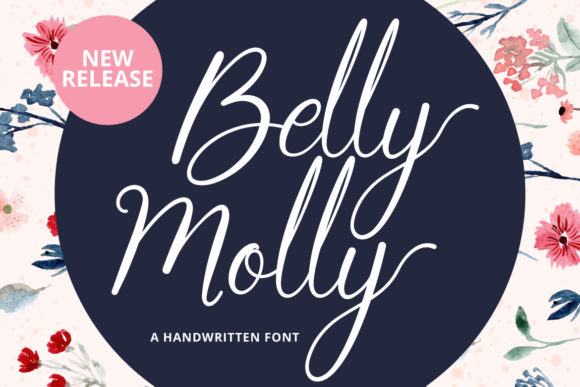
Belly Molly: A Script Font for Web Design
As a web designer, I’m always on the lookout for fonts that bring personality and visual interest to a site without sacrificing readability. Belly Molly has quickly become one of my go-to choices for headers, hero sections, and branding elements. Its elegant script style blends modernity with a touch of classic calligraphy, making it perfect for creative websites and digital brand experiences.
First Impressions in a Hero Section
I first tested Belly Molly in a hero section for a boutique online store. The font’s fluid curves and balanced weight gave the headline a soft yet confident presence. It didn’t overpower the background image, which was a subtle gradient, but it still stood out enough to draw the eye. The font felt fresh and approachable, which aligned well with the brand’s aesthetic.
On mobile devices, Belly Molly held up surprisingly well. The letterforms were distinct enough that even at smaller sizes, the text remained legible. I paired it with a clean sans serif for the body copy, which created a nice contrast and kept the design from feeling too ornate.
Using Belly Molly in Call-to-Action Buttons
Next, I tried Belly Molly on a call-to-action button for a course sales page. The font added a sense of elegance and creativity that matched the course’s theme. It worked especially well when used in a bold weight, giving the button a polished look without being too flashy.
However, I noticed that on dark backgrounds, some of the finer details of the script were harder to see. To fix this, I adjusted the text color slightly and increased the padding around the button. This made the text more readable while keeping the font’s character intact.
Pairing Belly Molly with Clean Typography
Font pairing is crucial in web design, and Belly Molly pairs beautifully with simple, modern typefaces. I often use it alongside a sans serif like Open Sans or Lato for body text. This combination keeps the design clean while allowing the script font to shine in headlines and accents.
For editorial-style sites, I’ve also paired Belly Molly with a serif font like Georgia or Merriweather. This creates a more traditional, print-like feel that works well for blogs, portfolios, and content-heavy pages.
Responsive Design Considerations
When designing for responsiveness, it’s important to test how a font behaves across different screen sizes. Belly Molly generally scales well, but I’ve found that using it for very small text—like navigation links or form labels—can reduce legibility. In those cases, switching to a simpler font is a better choice.
Another thing to keep in mind is how the font looks over images or gradients. While Belly Molly is beautiful on solid backgrounds, it can sometimes blend into complex textures. Using a subtle drop shadow or adjusting the text color helps maintain visibility without compromising the font’s style.
Best Uses for Belly Molly in Web Projects
Belly Molly excels in areas where visual impact matters most. It’s ideal for:
- Hero section headlines
- Call-to-action buttons
- Logo text and brand identity elements
- Portfolio project titles
- Blog headers and featured posts
- Digital ads and social media graphics
It’s also great for creating a cohesive visual language across a website. Whether you’re designing a creative portfolio, an online shop, or a coaching site, Belly Molly adds a unique flair that sets your design apart.
Things to Keep in Mind
While Belly Molly is a versatile font, it’s not suitable for every use case. Avoid using it for long paragraphs of body text, as the script style can make reading difficult. Similarly, it may not be the best choice for accessibility-focused interfaces or dashboards where clarity is key.
Before using Belly Molly on a live site, check that the font includes all necessary weights and styles. Make sure the webfont files are available and that the license allows for commercial use, especially if you're working on client projects or e-commerce sites.
Overall, Belly Molly is a standout font that brings a sense of sophistication and creativity to any web design. Its balance of elegance and modernity makes it a valuable addition to any designer’s toolkit, especially when used thoughtfully in headers, buttons, and branding elements.